
Nothing destroys website conversion rates faster than asking a genuine human visitor to identify blurry traffic lights, fire hydrants, or crosswalks across nine microscopic tiles. If you manage a contact form, lead generation page, or user registration endpoint in 2026, legacy captcha puzzles are actively driving your potential clients away.
For over a decade, Google reCAPTCHA was the default defensive mechanism against automated spambots. However, reCAPTCHA v2 degrades user experience with endless visual riddles, while reCAPTCHA v3 continuously tracks visitor cookies across the web—creating serious GDPR compliance liabilities and triggering false-positive blocks for legitimate users browsing via privacy-focused browsers or VPNs.
To solve this on my own client websites and software projects, I completely migrated from Google reCAPTCHA to Cloudflare Turnstile. Turnstile provides enterprise-grade, bot-detection technology wrapped in a frictionless, zero-puzzle experience. Best of all, Cloudflare offers Turnstile completely free of charge—even if your website's DNS is hosted elsewhere (like GoDaddy, Namecheap, or GitHub Pages).
Unlike Google reCAPTCHA, Turnstile never presents interactive puzzle challenges to human users. Instead, it utilizes non-intrusive browser environment telemetry, machine learning heuristics, and subtle Proof-of-Work (PoW) mathematical challenges executed in background web workers. Verification finishes in less than 50 milliseconds without tracking user personal data.
1. The Turnstile Verification Architecture
Before writing code, it is essential to understand how client-side captcha defense coordinates with your backend server. A common rookie mistake is verifying the captcha only in frontend JavaScript. Client-side validation can easily be bypassed by any automated Python script sending raw HTTP POST requests directly to your API endpoint.
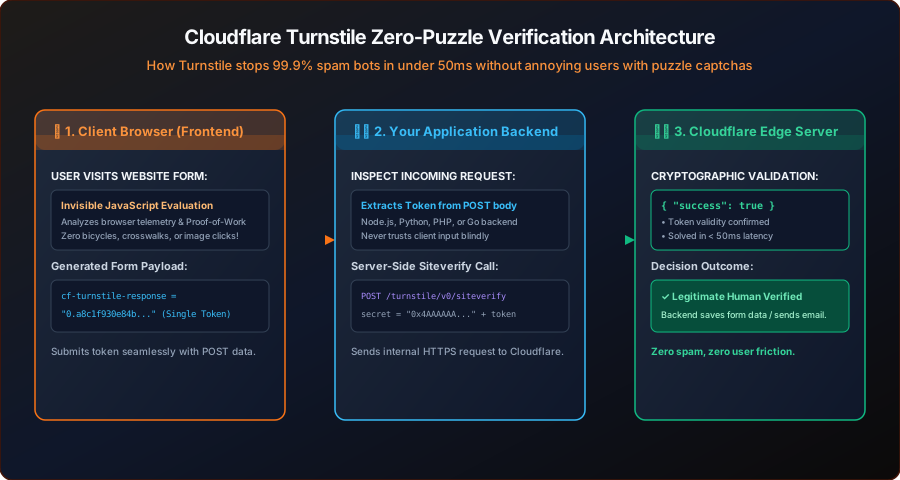
As demonstrated in the architecture diagram above, secure bot prevention requires a three-tier handshake:
- Browser Evaluation: The visitor arrives at your form. Cloudflare's lightweight JavaScript runtime executes a passive cryptographic challenge and injects a single-use verification token (
cf-turnstile-response) into the form. - Form Submission: When the user clicks "Submit", their form inputs along with the
cf-turnstile-responsetoken are transmitted to your web server via standard HTTP POST. - Server-Side Siteverify: Your backend server makes an out-of-band HTTPS request to Cloudflare's
siteverifyAPI endpoint using your private Secret Key. If Cloudflare returns{"success": true}, your backend accepts the data; if it fails, the request is rejected immediately.
2. Step 1: Creating Your Free Turnstile Site Key & Secret Key
You do not need to route your domain nameservers through Cloudflare to use Turnstile. Anyone with a free Cloudflare account can generate standalone widget credentials in under two minutes:
Log In to Cloudflare Dashboard
Navigate to dash.cloudflare.com. In the primary left-hand navigation sidebar, click on Turnstile.
Add a New Widget
Click the blue Add Site button. Enter a friendly Site Name (e.g., TyagiHub Contact Form) and your website's domain (e.g., tyagihub.in or localhost for local development).
Select Widget Mode: Managed (Recommended)
Cloudflare offers three widget modes. Choose Managed. In Managed mode, Cloudflare decides whether to run a completely invisible check or show a subtle interactive checkmark box only if the client exhibits suspicious signals.
Once saved, Cloudflare generates two distinct credentials:
- Site Key (Public): Starts with
0x4AAAAAA.... This key is safe to embed directly into your frontend HTML templates. - Secret Key (Private): Starts with
0x4AAAAAA.... This key must remain strictly confidential on your backend web server or environment variables (.env). Never commit this secret to public GitHub repositories!
3. Step 2: Embedding the Frontend HTML Widget
Integrating Turnstile into your existing HTML contact forms takes only two simple additions: importing the official Cloudflare Turnstile script, and inserting a placeholder container with your Site Key.
Here is a complete, production-ready HTML form implementation:
<!DOCTYPE html>
<html lang="en">
<head>
  <meta charset="UTF-8">
  <title>Contact Us - Protected by Cloudflare Turnstile</title>
  <!-- 1. Include Turnstile API script in head or before closing body -->
  <script src="https://challenges.cloudflare.com/turnstile/v0/api.js" async defer></script>
</head>
<body>

  <form action="/api/submit-contact" method="POST" id="contactForm">
    <div class="form-group">
      <label for="name">Full Name</label>
      <input type="text" id="name" name="name" required placeholder="Himanshu Tyagi">
    </div>

    <div class="form-group">
      <label for="email">Email Address</label>
      <input type="email" id="email" name="email" required placeholder="contact@tyagihub.in">
    </div>

    <div class="form-group">
      <label for="message">Message</label>
      <textarea id="message" name="message" rows="4" required></textarea>
    </div>

    <!-- 2. Cloudflare Turnstile Widget Placeholder -->
    <div class="cf-turnstile"
         data-sitekey="0x4AAAAAAAxXxXxXxXxXxXxX"
         data-theme="auto"
         style="margin: 1.5rem 0;"></div>

    <button type="submit" id="submitBtn">Send Message</button>
  </form>

</body>
</html>
When the page renders, Cloudflare automatically searches for any element with the class .cf-turnstile. It renders a clean, compact verification widget that matches your visitor's OS dark/light theme (via data-theme="auto"). Once verified, it automatically creates a hidden input field named cf-turnstile-response containing the encrypted cryptographic token.
4. Step 3: Backend Verification (Node.js & Express)
To prevent unauthorized bot scripts from spoofing requests, your backend server must validate the submitted token with Cloudflare's validation endpoint: https://challenges.cloudflare.com/turnstile/v0/siteverify.
Here is the exact server-side verification middleware I deploy in Node.js / Express applications:
// server.js (Node.js & Express)
const express = require('express');
const app = express();

app.use(express.urlencoded({ extended: true }));
app.use(express.json());

const TURNSTILE_SECRET_KEY = process.env.TURNSTILE_SECRET_KEY || '0x4AAAAAAAxXxXxXxXxXxXxX';

// Reusable Turnstile Verification Helper Function
async function verifyTurnstileToken(token, remoteIp) {
  const endpoint = 'https://challenges.cloudflare.com/turnstile/v0/siteverify';

  const formData = new URLSearchParams();
  formData.append('secret', TURNSTILE_SECRET_KEY);
  formData.append('response', token);
  if (remoteIp) {
    formData.append('remoteip', remoteIp);
  }

  const response = await fetch(endpoint, {
    method: 'POST',
    body: formData,
    headers: {
      'Content-Type': 'application/x-www-form-urlencoded',
    },
  });

  const outcome = await response.json();
  return outcome;
}

// Contact Form POST Route
app.post('/api/submit-contact', async (req, res) => {
  const token = req.body['cf-turnstile-response'];
  const clientIp = req.headers['x-forwarded-for'] || req.socket.remoteAddress;

  // 1. Verify token presence
  if (!token) {
    return res.status(400).json({
      success: false,
      message: 'Bot verification token missing. Please reload the page.'
    });
  }

  try {
    // 2. Validate token with Cloudflare Edge
    const verification = await verifyTurnstileToken(token, clientIp);

    if (!verification.success) {
      console.warn('Bot detection triggered:', verification['error-codes']);
      return res.status(403).json({
        success: false,
        message: 'Security challenge failed. Automated bots are blocked.'
      });
    }

    // 3. Process the verified submission
    const { name, email, message } = req.body;
    console.log(`Verified human submission received from: ${name} (${email})`);

    // Save to database, dispatch notification email, etc.
    return res.status(200).json({
      success: true,
      message: 'Thank you! Your message has been received securely.'
    });

  } catch (error) {
    console.error('Turnstile verification network error:', error);
    return res.status(500).json({
      success: false,
      message: 'Internal verification server error.'
    });
  }
});

app.listen(3000, () => console.log('Server running on port 3000'));
5. PHP Backend Implementation (WordPress & Shared Hosting)
If you are running a classic PHP website, custom contact form, or WordPress hook, here is the clean native PHP verification code using curl:
<?php
// verify-contact.php
if ($_SERVER['REQUEST_METHOD'] === 'POST') {
    $turnstile_token = $_POST['cf-turnstile-response'] ?? '';
    $secret_key = '0x4AAAAAAAxXxXxXxXxXxXxX'; // Store securely in your config
    $client_ip = $_SERVER['REMOTE_ADDR'] ?? '';

    if (empty($turnstile_token)) {
        http_response_code(400);
        die("Security token missing.");
    }

    // Prepare POST data for Cloudflare API
    $post_data = http_build_query([
        'secret'   => $secret_key,
        'response' => $turnstile_token,
        'remoteip' => $client_ip
    ]);

    $ch = curl_init();
    curl_setopt($ch, CURLOPT_URL, 'https://challenges.cloudflare.com/turnstile/v0/siteverify');
    curl_setopt($ch, CURLOPT_POST, true);
    curl_setopt($ch, CURLOPT_POSTFIELDS, $post_data);
    curl_setopt($ch, CURLOPT_RETURNTRANSFER, true);
    curl_setopt($ch, CURLOPT_TIMEOUT, 5);

    $response = curl_exec($ch);
    curl_close($ch);

    $result = json_decode($response, true);

    if ($result && isset($result['success']) && $result['success'] === true) {
        // Verification succeeded!
        $name = htmlspecialchars($_POST['name'] ?? '');
        $email = filter_var($_POST['email'] ?? '', FILTER_SANITIZE_EMAIL);

        // Dispatch email or process order
        echo "Thank you, " . $name . "! Your message was sent.";
    } else {
        http_response_code(403);
        echo "Verification failed. Spambots are prohibited.";
    }
}
?>
6. Feature Comparison: Turnstile vs Legacy Captchas
To visualize why developers worldwide are migrating to Turnstile, let's examine how it stacks up against Google reCAPTCHA and hCaptcha across key metrics:
| Feature | Cloudflare Turnstile | Google reCAPTCHA v2 | Google reCAPTCHA v3 |
|---|---|---|---|
| User Puzzles (Images) | Never (Zero Puzzles) | Frequent (Crosswalks, Buses) | None (Score Based) |
| Pricing & Free Tier | 100% Free (Unlimited) | Paid past 10k assessments | Paid past 10k assessments |
| GDPR & Privacy Compliance | Full Privacy / No Ad Tracking | Tracks Google cookies | Severe cross-site tracking |
| Average Solvetime Latency | Under 50ms | 12 to 25 seconds | Under 150ms |
| Works on Any Host (GitHub/VPS) | Yes (Zero DNS Lock-in) | Yes | Yes |
7. Local Testing & Dummy Test Keys
When developing web apps on localhost or running unit tests in automated CI/CD pipelines, you should never hit live Cloudflare production keys. Cloudflare provides official, dummy test keys that consistently return deterministic results:
- Always Pass (Success):
- Site Key:
1x00000000000000000000AA - Secret Key:
1x0000000000000000000000000000000AA - Behavior: Always passes immediately with a valid token. Perfect for staging and development.
- Site Key:
- Always Fail (Block):
- Site Key:
2x00000000000000000000AB - Secret Key:
2x0000000000000000000000000000000AA - Behavior: Always triggers an explicit rejection error. Use this to verify that your backend correctly handles and blocks suspicious requests.
- Site Key:
- Always Force Interactive Challenge:
- Site Key:
3x00000000000000000000FF - Secret Key:
1x0000000000000000000000000000000AA - Behavior: Forces the visual checkmark box to appear so you can test CSS positioning and UI alignment.
- Site Key:
8. Troubleshooting Common Integration Errors
Q: Why does the widget say "Invalid Domain"?
In your Cloudflare Turnstile dashboard settings, you must add the exact domain where the form is hosted. If you are developing locally, ensure you add localhost or 127.0.0.1 to the allowed domains list.
Q: Why does the token fail with "timeout-or-duplicate"?
Turnstile tokens expire after 300 seconds (5 minutes) and can only be verified once. If a user leaves the form open for 15 minutes before clicking submit, or if your backend code attempts to call siteverify twice with the same token, Cloudflare returns timeout-or-duplicate. Use Turnstile's automatic token refresh callback (data-response-field="true") to keep long-standing forms fresh.
Q: Can I use Turnstile on static sites without my own backend?
Yes! Popular form-handling services like Formspree, Formkeep, Basin, and Zoho Forms feature native Turnstile toggles. Simply paste your Site Key and Secret Key into their dashboard settings to protect your static site without writing backend code.