

When building a personal portfolio, documentation site, landing page, or static blog, one of the most frustrating recurring expenses is web hosting. Traditional hosting providers like Hostinger, GoDaddy, and Bluehost entice you with introductory rates of ₹149/month, only to slap you with renewal bills of ₹4,000 to ₹7,000 annually — along with extra charges for basic SSL security certificates or domain privacy.
For content-driven websites built with HTML, CSS, JavaScript, or static site generators, paying for shared hosting servers running outdated Apache or cPanel stacks makes very little technical sense. Shared servers suffer from database slowdowns, unexpected downtime, and vulnerability to malware injections.
The most reliable, enterprise-grade alternative used by developers and tech companies worldwide is GitHub Pages. GitHub provides 100% free static web hosting directly from your Git repository, backed by Fastly's global CDN edge network, with unlimited automated Let's Encrypt SSL certificates and zero server maintenance costs.
In this exhaustive, verified tutorial, I will walk you through the exact process: from preparing your repository and creating the critical CNAME file to configuring apex A-records and CNAME entries in your GoDaddy or Namecheap DNS manager.
By hosting your static site on GitHub Pages, your ongoing hosting cost is literally ₹0 per year forever. The only fee you ever pay is your standard domain renewal (approx ₹800–₹1,000/year for a .in or .com). You save thousands of rupees every single year while gaining 99.99% uptime and bulletproof security.
1. How GitHub Pages Custom Domain Routing Works
Before changing DNS zone records, it is critical to understand the technical pipeline that connects your custom domain name to GitHub's global servers:
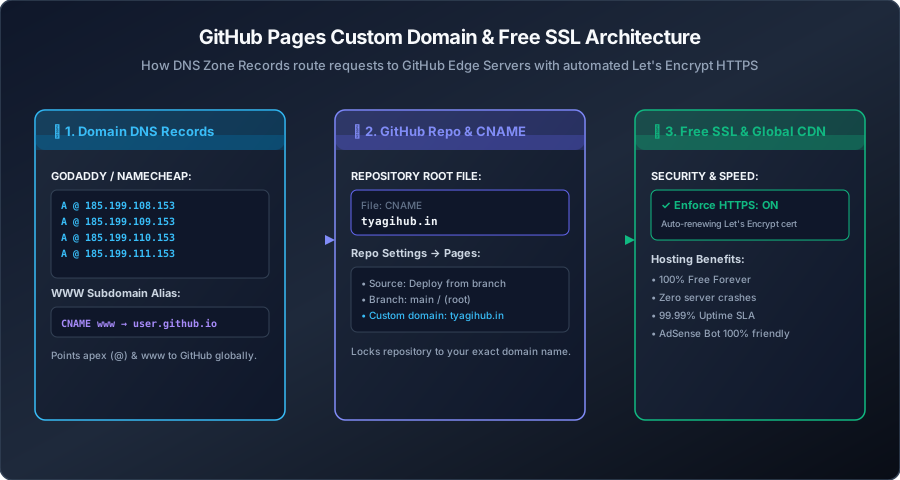
When a visitor types yourdomain.com in their browser:
- The DNS resolver queries the 4 GitHub A-Records to find the nearest global edge IP address.
- GitHub's edge server inspects the incoming HTTP request header and matches the requested domain against the
CNAMEfile stored in your repository. - GitHub automatically attaches a trusted, auto-renewing SSL certificate and serves your static files in milliseconds.
2. Step 1: Prepare Your GitHub Repository
To host a website on GitHub Pages, your code must reside in a public or private GitHub repository.
my-website).
index.html file in the root directory (or in a /docs folder).
GitHub Pages looks for index.html as the primary entry point for any incoming web visitor.
CNAME (capital letters, no extension like .txt) directly in the root of your repository.
Inside this file, write your exact custom domain name on a single line with no http or slashes:
tyagihub.in
3. Step 2: Configure the 4 GitHub Apex A-Records in Your DNS Manager
Now open a new browser tab and navigate to your domain registrar's control panel (GoDaddy, Namecheap, Hostinger, BigRock, etc.). Find the DNS Management / DNS Zone Editor for your domain.
To route the root apex domain (e.g., tyagihub.in without www) to GitHub, you must create four distinct A-Records. These point your domain to GitHub's globally distributed anycast IP addresses:
| Record Type | Host / Name | Value / Destination IP | TTL |
|---|---|---|---|
| A | @ (or blank) |
185.199.108.153 |
1 Hour / Automatic |
| A | @ (or blank) |
185.199.109.153 |
1 Hour / Automatic |
| A | @ (or blank) |
185.199.110.153 |
1 Hour / Automatic |
| A | @ (or blank) |
185.199.111.153 |
1 Hour / Automatic |
Before adding these four records, check your DNS zone table for any existing A-records pointing to old parking pages or previous web hosts. Having multiple conflicting A-records will cause random connection timeouts and SSL generation failures.
4. Step 3: Configure the WWW CNAME Record
To ensure visitors who type www.yourdomain.com reach your website without hitting an error, add a CNAME record:
| Record Type | Host / Name | Value / Target | TTL |
|---|---|---|---|
| CNAME | www |
yourusername.github.io |
1 Hour / Automatic |
Note: Replace yourusername with your actual GitHub account username or organization name.
5. Step 4: Activating GitHub Pages in Repository Settings
Once your DNS records are saved in your registrar, return to your GitHub repository:
Select your deployment branch (e.g., main or gh-pages) and folder (usually / (root)). Click Save.
tyagihub.in and click Save.
GitHub will run an automated DNS check. Within a few minutes, you will see a green checkmark: "DNS check successful".
6. Step 5: Enabling Automated Free SSL (Enforce HTTPS)
Security is critical for user trust, search engine ranking, and Google AdSense approval. Websites lacking an HTTPS certificate are marked as "Not Secure" by modern browsers.
GitHub Pages provides automated, lifetime-renewing SSL certificates via Let's Encrypt:
- Under the Custom Domain section in GitHub Pages settings, locate the checkbox labeled Enforce HTTPS.
- If the checkbox is grayed out, wait 10 to 15 minutes while GitHub issues your certificate in the background.
- Once active, check Enforce HTTPS.
From this moment forward, any visitor who accesses your site via http:// is instantly redirected to the secure, encrypted https:// version with a clean browser padlock icon.
7. GitHub Pages vs. Netlify vs. Vercel vs. Cloudflare Pages
When evaluating zero-cost static hosting platforms, developers often compare GitHub Pages against other modern options. Here is how they stack up for independent creators and solopreneurs:
| Platform | Free Bandwidth Limit | Custom Domain SSL | Best Used For |
|---|---|---|---|
| GitHub Pages | 100 GB / month | Automatic Let's Encrypt | Standard static HTML/CSS/JS, documentation blogs, and portfolios with zero configuration. |
| Cloudflare Pages | Unlimited bandwidth | Automatic Cloudflare Edge SSL | High-traffic static sites, though beware of aggressive bot challenges blocking AdSense crawlers. |
| Netlify | 100 GB / month | Automatic Let's Encrypt | Forms and serverless lambda functions, though bandwidth overages are billed sharply at $55/100GB. |
| Vercel | 100 GB / month | Automatic Let's Encrypt | Next.js and full-stack React frameworks, strictly non-commercial on the free hobby plan. |
8. Automated Zero-Click Deployments with GitHub Actions
If your website uses a static build script (like our custom Node.js generator), you don't even have to manually compile files on your local computer. You can configure a GitHub Actions Workflow to automatically build and deploy your site the instant you push changes:
.github/workflows/deploy.yml.
name: Build & Deploy to GitHub Pages

on:
  push:
    branches:
      - main

jobs:
  deploy:
    runs-on: ubuntu-latest
    steps:
      - name: Checkout Code
        uses: actions/checkout@v4

      - name: Set up Node.js
        uses: actions/setup-node@v4
        with:
          node-version: 20

      - name: Install Dependencies & Build
        run: |
          npm install
          node build.js

      - name: Deploy to GitHub Pages
        uses: peaceiris/actions-gh-pages@v3
        with:
          github_token: ${{ secrets.GITHUB_TOKEN }}
          publish_dir: ./public
          cname: tyagihub.in
With this workflow enabled, you can write a new markdown article on your laptop, commit it with Git, and GitHub's cloud runners will execute your build script, regenerate your sitemap, and publish your new pages live within 45 seconds — without touching a single server.
---9. Verifying DNS Propagation (The Command Line Check)
DNS updates usually take between 5 to 30 minutes, although registrars officially state up to 24 hours. You can verify that your A-records are pointing correctly using your computer's terminal:
# Test DNS A-Records via Command Prompt or PowerShell
nslookup tyagihub.in 8.8.8.8
If configured correctly, the terminal output will return GitHub's 4 IP addresses:
Non-authoritative answer:
Name:    tyagihub.in
Addresses:  185.199.108.153
            185.199.109.153
            185.199.110.153
185.199.111.1538. Common Troubleshooting & FAQ
mx.zoho.in) and SPF TXT records remain in your registrar's DNS manager, your business email will continue functioning seamlessly without a second of downtime.
ipconfig /flushdns in PowerShell and allow 15–30 minutes for registrar propagation.
Conclusion: High-Speed Web Hosting with Zero Server Bills
Hosting a professional, fast, and secure website does not require spending thousands of rupees every year on bloated shared hosting plans.
By deploying your static HTML, CSS, and client-side code directly to GitHub Pages and binding your custom domain with proper DNS A-records, you unlock world-class CDN speeds, automatic SSL security, and 100% peace of mind. Combine this zero-cost hosting architecture with your custom domain business email, and you have a bulletproof digital foundation with zero ongoing server expenses.