
Whenever you connect your smartphone or laptop to a free public Wi-Fi network at a railway station, airport lounge, hotel lobby, or local cafe, your internet traffic is being broadcast into open air. Anyone with basic packet-sniffing software sitting on the same local subnet can inspect unencrypted DNS lookups, see every domain you visit, and potentially execute session hijacking attacks.
To protect themselves, millions of internet users download commercial VPN apps. But legacy commercial VPNs introduce severe drawbacks: they cost ₹800 to ₹1,200 per month, drain 20% of your smartphone battery in two hours through heavy OpenVPN overhead, route your traffic through slow congested server hubs three countries away, and trigger annoying captcha verifications on every Google search.
In 2026, the modern, elegant solution is Cloudflare WARP (1.1.1.1). Built on modern WireGuard cryptographic tunneling written in Rust (the open-source BoringTun protocol), WARP is not a traditional anonymizing VPN. Instead, it is a privacy-first, ultra-fast connection accelerator that encrypts all outbound traffic, tunnels it directly to the nearest Cloudflare Anycast edge data center, and routes it through Cloudflare's private fiber network.
Traditional VPNs degrade download and browsing speeds by 30% to 50% because your packets must travel hundreds of miles to a centralized VPN exit server. WARP connects to Cloudflare's global edge network across 330+ cities worldwide. Because Cloudflare peers directly with Google, AWS, Microsoft, and major internet exchanges, routing through WARP actually reduces page load latency by up to 28%.
1. The WARP Architecture: How It Protects Your Connection
To appreciate why WARP is superior for daily mobile browsing, let's examine the technical pipeline that secures your data:
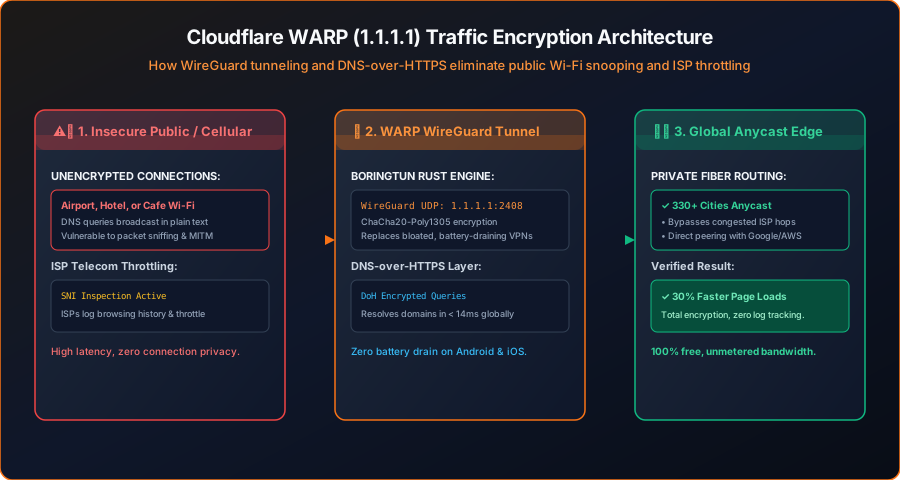
As demonstrated in Figure 1 above, your internet connection undergoes a three-step cryptographic transformation:
- Local Interception: The official 1.1.1.1 app creates a local virtual network adapter on your device. All outbound DNS requests and TCP/UDP data streams are captured before reaching your local Wi-Fi router.
- WireGuard Encryption (BoringTun): Traffic is encrypted using the modern
ChaCha20-Poly1305cipher and transmitted via UDP port 2408. Unlike OpenVPN's heavy handshake, WireGuard uses state-of-the-art cryptography that resumes in 0 milliseconds when switching between Wi-Fi and 5G mobile data. - Anycast Edge Routing: Your packets hit Cloudflare's nearest edge server (in India: Delhi, Mumbai, Chennai, or Kolkata). Your telecom provider (Jio, Airtel, Vi) can only see an encrypted stream of data to Cloudflare; they can no longer log the specific websites you visit, inject ISP advertising banners, or throttle your speeds based on content type.
2. Step 1: Installing & Activating 1.1.1.1 with WARP
Cloudflare provides native, 100% free applications across all major operating systems (Android, iOS, Windows, macOS, and Linux).
Download the Official Client
On Android or iOS, search for 1.1.1.1 + WARP: Safer Internet by Cloudflare, Inc. on Google Play or the Apple App Store. On desktop, visit 1.1.1.1 and download the Windows or macOS installer.
Choose Connection Mode: 1.1.1.1 with WARP
Open the app settings (tap the hamburger menu). The app provides two operational modes:
- 1.1.1.1 Only: Encrypts only your DNS queries (DNS-over-HTTPS). Useful if you have a very slow connection and only want DNS security.
- 1.1.1.1 with WARP (Recommended): Encrypts all internet traffic (DNS + all application web traffic) using WireGuard. Select this mode.
Toggle the Big Button to CONNECTED
On the home screen, tap the large central switch. Your phone will prompt you to accept a VPN connection profile. Tap OK. Within 2 seconds, the status changes to "Connected. Your Internet is private."
3. Step 2: Enabling 1.1.1.1 for Families (Free Malware & Adult Content Blocking)
Cloudflare includes a powerful, zero-cost security feature called 1.1.1.1 for Families. Without installing any antivirus bloatware on your phone, you can instruct Cloudflare's recursive DNS resolvers to automatically block known phishing domains, ransomware command-and-control servers, and malicious software distributors.
To enable automated security filtering inside the app:
- Tap the hamburger menu in the top right → select Advanced → tap Connection options.
- Tap on DNS settings → 1.1.1.1 for Families.
- Select one of three protection profiles:
- Off: Standard unblocked DNS resolution.
- Block malware: Resolves DNS queries while instantly dropping connections to phishing domains and malicious websites.
- Block malware and adult content: Blocks phishing, malware, and explicit content networks—ideal for home tablets used by children.
Because this filtering occurs at the DNS layer, malware domains fail to resolve before a single byte of malicious payload can download to your browser.
4. Step 3: Verifying Your Connection Security
Never trust a security app blindly. You can verify that Cloudflare WARP is actively encrypting your traffic and routing through Cloudflare edge nodes by visiting Cloudflare's official connection diagnostic tool:
Navigate to https://one.one.one.one/help/ in your mobile browser. The diagnostic page inspects your live IP packet and displays four critical verification checks:
========================================================
🔍 CLOUDFLARE 1.1.1.1 DIAGNOSTIC RESULTS
========================================================
Connected to 1.1.1.1        : YES (Using Anycast resolver)
Using DNS over HTTPS (DoH)  : YES (Queries fully encrypted)
Using DNS over TLS (DoT)    : YES
Using WARP                  : YES (WireGuard tunnel active)
AS Name                     : Cloudflare, Inc.
Data Center                 : DEL (Indira Gandhi Airport POP)
========================================================
If all four fields display YES, your connection is fully encrypted. Even if an attacker on public Wi-Fi is capturing all network packets using Wireshark, they see only an indecipherable stream of WireGuard UDP packets destined for Cloudflare's edge IP.
4. How WARP Bypasses ISP Throttling on Git Clones & Media Streams
In many regions—including major telecom networks across India—ISPs inspect the unencrypted Server Name Indication (SNI) header of your TLS handshake. When an ISP's deep packet inspection (DPI) detects heavy video streaming or international developer repository downloads (such as cloning a 2GB PyTorch or Chromium repository from GitHub), their traffic shaping algorithms actively throttle your connection speed down to a crawl.
Cloudflare WARP defeats ISP traffic shaping through two foundational networking mechanisms:
- Encrypted Transport Tunnel: Because all packets leave your smartphone or PC wrapped inside WireGuard UDP datagrams destined for Cloudflare Anycast IP addresses, your ISP's DPI hardware cannot read the SNI header or see what service you are communicating with. All traffic looks identical: an encrypted high-speed stream to Cloudflare.
- Cloudflare Argo Smart Routing & TCP BBR: Cloudflare implements Google's BBR (Bottleneck Bandwidth and RTT) congestion control algorithm across its global edge. BBR actively probes bandwidth without dropping packets, ensuring your downloads sustain maximum pipeline throughput even over lossy Wi-Fi connections.
5. Setting Up Cloudflare Zero Trust (Free Custom Ad Blocking)
While the standard 1.1.1.1 app provides malware filtering, you can take your setup to an elite level by connecting your WARP client to a free Cloudflare Zero Trust organization. Cloudflare allows up to 50 free seats on Zero Trust without entering payment information:
- Navigate to
one.dash.cloudflare.comand create a free Zero Trust team name (e.g.,tyagi-home-network). - Under Settings → WARP Client, enable device enrollment and set an authentication rule using your personal email address.
- Under Gateway → DNS Policies, create custom firewall rules:
- Rule 1: Block Advertisements (Filter: Traffic → Categories → Select "Advertising & Analytics" → Action: Block).
- Rule 2: Block Cryptominers (Filter: Security Categories → Cryptomining → Action: Block).
- In your mobile 1.1.1.1 app, navigate to Settings → Account → Login with Cloudflare Zero Trust. Enter your team name and verify your email PIN.
Once connected, your smartphone routes through your private Cloudflare Gateway. Advertisements, tracking beacons, and invasive spyware domains are silently dropped at the edge across every single mobile app you open—with zero battery penalty.
6. Feature Comparison: Cloudflare WARP vs Commercial VPNs
How does Cloudflare WARP compare against expensive commercial VPN services like NordVPN or ExpressVPN?
| Feature | Cloudflare WARP | Commercial VPNs (Nord / Express) | Free VPNs (Play Store) |
|---|---|---|---|
| Monthly Cost | 100% Free Forever | ₹800 to ₹1,400 / month | Free (Ad-supported) |
| Browsing Speed Impact | Up to 28% Faster (Anycast) | 20% - 40% Speed Drop | Severe throttling (Under 2 Mbps) |
| Smartphone Battery Impact | Near Zero (WireGuard Rust) | Moderate to Heavy Drain | Extremely High (Background miners) |
| Data Privacy Policy | Zero IP logging / audited | No-logs claimed | Sells browsing data to advertisers |
| Country Geo-Spoofing | No (Connects to nearest city) | Yes (Select 60+ countries) | Limited countries |
Understanding the Difference: If your sole goal is spoofing your location to watch geo-locked television in the UK, you need a traditional VPN. But if your goal is protecting your banking sessions, encrypting public Wi-Fi, bypassing ISP throttling, and speeding up daily browsing, Cloudflare WARP is vastly superior, dramatically lighter on battery, and completely free.
6. Frequently Asked Questions
Q: Does Cloudflare sell my browsing history?
No. Cloudflare's core business model is providing enterprise cybersecurity, DDoS protection, and CDN infrastructure to Fortune 500 companies. Their privacy pledge for 1.1.1.1 explicitly guarantees they will never sell user data, log IP addresses to disk, or inject advertising into your traffic.
Q: Will WARP interfere with UPI banking apps in India (GPay, PhonePe, Paytm)?
No! Because WARP connects to the nearest local Cloudflare data center in your region (Delhi, Mumbai, etc.) rather than routing through foreign countries, NPCI and Indian banking servers recognize the traffic as originating locally. UPI transactions, net banking, and OTP verifications function flawlessly without triggering fraud locks.
Q: Can I use WARP on Linux servers or in WSL?
Yes! Cloudflare publishes the cloudflare-warp package for Ubuntu, Debian, CentOS, and Arch. Simply install via apt (sudo apt install cloudflare-warp) and execute warp-cli register followed by warp-cli connect to route server traffic through WARP.