
Between Notion databases, Slack channels, Todoist reminders, Google Calendar color-coded blocks, and forty-five open browser tabs, the modern knowledge worker spends more time managing their productivity tools than actually doing productive work. In 2026, our digital devices are not tools for deep focus—they are hyper-engineered distraction machines designed to fragment our attention every six minutes.
As a software developer and solo founder managing multiple web applications, server deployments, and client deliverables from my home workstation in Ghaziabad, I hit a severe wall of cognitive exhaustion eighteen months ago. My screen time exceeded eleven hours a day. Even when I sat down to write code, a notification chime or an impulse to "quickly check analytics" would derail forty-five minutes of concentrated momentum.
In frustration, I conducted an experiment: I shut down all digital task managers and spent thirty days running my entire workday using only two physical tools: a single unlined 3x5 inch index card and an open pocket paper notebook sitting beside my keyboard. The result was startling: my daily deep-work output doubled, my evening work anxiety evaporated, and for the first time in years, I experienced uninterrupted creative clarity.
Digital apps suffer from infinite canvas syndrome: you can add 500 tasks, nest twenty sub-pages, and tag three hundred items with color labels. But human working memory cannot hold 500 items. Physical paper imposes a natural, physical boundary. You cannot fit 50 tasks on a 3x5 index card—and that forced constraint is precisely what makes you productive.
1. The 3-Tier Analog Daily Focus System
The system is built on simplicity, tactile feedback, and strict psychological separation between planning, execution, and shutdown.
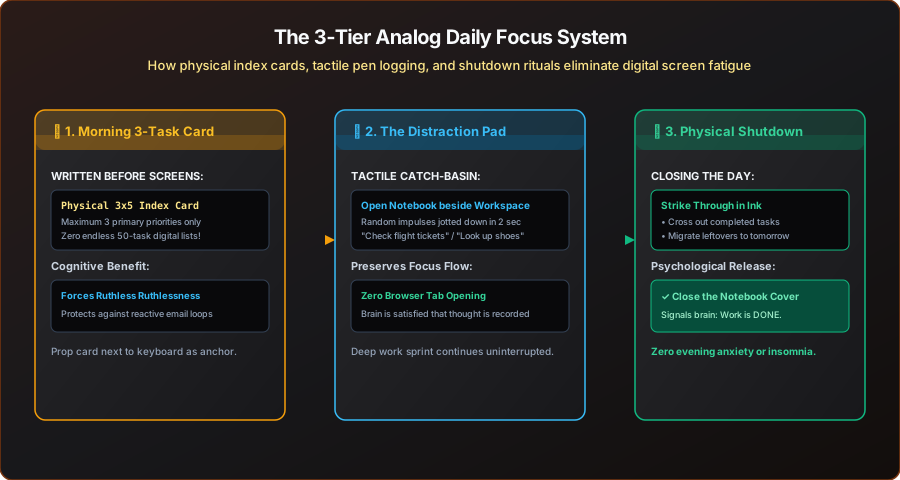
As mapped in Figure 1, the workflow consists of three daily checkpoints:
- The Morning 3-Task Card: Written in ink before turning on monitors or checking incoming messages. You pick three, and only three, non-negotiable priorities for the entire day.
- The Distraction Pad (Catch-Basin): During 90-minute deep work blocks, an open notebook sits to the side. Every fleeting thought, urgent curiosity, or random impulse is jotted down on paper in two seconds without opening a browser tab.
- The Evening Physical Shutdown: Crossing out completed tasks with physical ink provides visceral dopamine release. Unfinished items are migrated, and the notebook is physically closed—signaling to your nervous system that the workday is officially over.
2. Step 1: The Rule of Three & The 3x5 Index Card
Every morning at 8:30 AM, while drinking black coffee and before launching any browser tabs, I take a fresh 3x5 inch index card (or a small sheet of heavy paper) and write today's date at the top.
Underneath, I draw three empty checkboxes and write my Three High-Impact Deliverables:
====================================
📅 WEDNESDAY, NOV 18 - FOCUS CARD
====================================
[ ] 1. Ship Cloudflare Turnstile integration on client auth endpoint.
[ ] 2. Draft & publish 1,600-word developer guide on GitHub Pages DNS.
[ ] 3. Review & submit monthly GST return statement.
------------------------------------
⚡ Secondary / Errands (Max 2):
- Reply to Kunal's staging feedback on WhatsApp.
- Order replacement ergonomic wrist rest.
====================================
Notice what is absent: there are no twenty-item chore lists, no vague entries like "Work on website", and no endless administrative micro-tasks. If I complete these three items, the day is an unequivocal 100% success—even if I answer zero optional emails.
I prop this physical card right beneath my computer monitor against the screen bezel. Throughout the day, whenever my eyes wander or my attention drifts toward opening YouTube or Twitter, that physical white card stares right back at me, reminding me of my exact singular mission.
3. Step 2: The "Distraction Pad" (Eliminating Browser Tab Rabbit Holes)
Have you ever sat down to write a technical document or fix a database bug, and twenty minutes in, your brain suddenly thinks: "Did I pay the electricity bill?" or "I wonder what the weather in Manali is next weekend?"
In a purely digital setup, you switch to a browser tab to check that thought. But the moment you open a new tab, you see news headlines, YouTube recommendations, or unread emails. Forty-five minutes disappear, and your deep work train of thought is permanently lost.
The Distraction Pad solves this through tactile offloading:
Keep an Open Notebook Beside Your Keyboard
Always keep a physical notebook open with a pen resting across the spine. Never close it during working hours—it should be ready for instant zero-latency capture.
Jot the Impulsive Thought Down in Ink
When a stray thought strikes, write it down in under three seconds: Pay power bill after 5 PM. Do NOT open a browser. Do NOT touch your phone.
Return to Deep Work Instantly
Because the thought is physically preserved on paper, your brain's working memory releases the anxiety of forgetting it. You return to your code or writing with zero cognitive drag.
4. Step 3: The Evening Physical Shutdown Ritual
Remote workers and freelancers frequently suffer from a condition known as boundary blur: because your laptop is always ten feet away, your brain never truly stops working. You check Slack at 9:30 PM, stare at pull requests from bed, and wake up feeling groggy and unrefreshed.
A physical notebook provides what digital apps fundamentally cannot: tactile completion.
At 6:30 PM every evening, I execute a five-minute shutdown routine:
- Strike Through with Ink: I take my pen and physically draw a bold line through each completed checkbox on my 3x5 index card. Crossing something off on paper releases far more neurochemical satisfaction than clicking a digital checkbox in an app.
- Process the Distraction Pad: I review the five or six random notes scribbled during the day. If an electricity bill needs paying, I handle it now. If a thought was trivial, I strike it out.
- Migrate Leftovers: If one of the 3 major items was only partially finished, I write it onto tomorrow's fresh index card.
- Physically Close the Notebook: I place the pen on the desk, close the notebook cover, and tuck the index card away. I recite out loud: "Work day complete."
This physical action creates an unmistakable sensory signal to your brain. When the book is shut, work is over. The evening belongs to family, dinner, exercise, and deep recovery.
5. The Neuroscience of Handwriting: Why Pen & Paper Beats Typing
Many software developers ask: "Why can't I just use a minimal digital text file (like scratch.txt or Apple Notes) instead of paper?"
Cognitive neuroscience research reveals that typing and handwriting engage completely different neural pathways in the human brain:
- Typing is Shallow Transcription: When typing on a mechanical keyboard at 80 words per minute, your brain operates on motor autopilot. You can mindlessly type whole paragraphs without cognitively digesting the conceptual architecture.
- Handwriting Enforces Conceptual Synthesis: Because writing by hand is physically slower, your brain is forced to summarize, filter, and restructure information before the ink meets the paper fibers. You cannot write everything down—so your prefrontal cortex immediately discards trivial fluff.
- Spatial Orientation & Memory Anchors: When you brainstorm a database schema or state machine diagram on physical paper, your brain forms spatial memory: "The caching layer was sketched in the top right corner with a circled star." Digital screens lack spatial persistence because scrolling continually resets the visual frame.
Whenever I encounter a difficult software architecture dilemma—such as optimizing an asynchronous queue or untangling recursive database relationships—I push the keyboard back, open my notebook, and sketch state transitions by hand. Nine times out of ten, the solution reveals itself on paper within ten minutes.
6. Hardware Recommendations: Keeping It Simple
You do not need expensive imported stationery or ₹5,000 fountain pens to make this system work. The best gear is durable, accessible, and enjoyable to hold:
| Item | Recommended Tool | Why It Excels | Approx Price |
|---|---|---|---|
| Daily Focus Cards | Standard 3x5 Ruled Index Cards (100 pack) | Rigid cardstock stands upright; cannot bend or get lost under papers. | ₹120 / pack |
| Distraction Pad Notebook | A5 Hardcover Dotted Journal (120 GSM) | Lies completely flat on desk; zero page curling; ink does not bleed through. | ₹350 - ₹500 |
| Primary Everyday Pen | Pilot G2 (0.7mm) or Uni-ball Eye Rollerball | Smooth dark ink flow; minimal hand fatigue during long writing sessions. | ₹60 - ₹120 |
6. Digital vs Analog: When to Use Which
Adopting an analog focus system does not mean abandoning technology. The goal is to match each medium to its natural superpower:
- Use Digital (Notion, Git, Cloud Storage) For:
- Permanent reference documentation and code snippets.
- Long-term project roadmaps spanning multiple quarters.
- Searchable client contracts, billing invoices, and tax receipts.
- Use Analog (Paper, Index Cards, Notebooks) For:
- Daily tactical execution and the current hour's priorities.
- Capturing sudden thoughts without screen distraction.
- Brainstorming difficult architectural problems before writing code.
- Establishing a clean, healthy boundary between work and rest.
7. Frequently Asked Questions
Q: What if I have 10 urgent things to do in a single day?
If everything is urgent, nothing is urgent. The brutal truth of human capacity is that attempting ten complex tasks in one day results in ten half-finished, mediocre outputs. If you truly have urgent administrative chores, bunch them into a single 45-minute sprint treated as ONE of your three cards.
Q: Do I keep old index cards forever?
No. At the end of each week, I look through the five completed cards to appreciate the week's accomplishments, and then I recycle them. The power of the index card is not long-term storage—it is present-moment focus.